Requirements: Android OS 1.6 + Overview: IVONA – The leader in realistic, natural-sounding & accurate TTS voices for your Android device.
No more robotic, sythesized voices. IVONA for Android replaces the synthesized text-to-speech (TTS) voices currently available on your Android device with more natural sounding, accurate & easy-to-understand voices. Select from 13 different languages to find the one best suited for you. Easy to install one or several different voices! IVONA is compatible with many of your favorite Android applications. With IVONA, enjoy: . Turn-by-turn voice navigation so you can keep your eyes on the road (e.g. Google Maps) .Have your ebooks naturally read aloud to you (e.g. Moon+ Reader Pro) . Listen to online content, articles, PDF documents & RSS feeds (e.g. Pocket, ezPDF Reader, gReader) . Change the voice on your virtual assistant (e.g. Jeannie, iris, Skyvi)
Key features include: . BrightVoice technology provides lifelike, expressive reading of all your text . Clear & easy-to-understand sound – even in noisy environments . A rapidly expanding portfolio of award-winning voices available in multiple languages, accents & genders . Easy-to-install & use with automatic, free updates
Get started in 4 easy steps: 1. Install IVONA Text-to-Speech HQ to your Android device from the Google Play store 2. Select & install your preferred language and voice(s) from the Google Play store 3. Once downloaded, launch the IVONA app to complete your installation 4. Finally, Select IVONA TTS Engine as your default engine by navigating to Android Settings Now you’re ready to experience world-class IVONA Text-to-Speech & IVONA voices on your favorite text-to-speech enabled Android apps.
Coba Ada yang mengerti fungsi Software ini kalian pasti agak binggung ya oleh karena itu saya mencoba memberi referensi tentang Java Runtime Environment sebagai berikut
Perangkat lunak Java memungkinkan Anda untuk menjalankan aplikasi yang disebut "applet" yang ditulis dalam bahasa pemrograman Java. Applet ini memungkinkan Anda untuk memiliki pengalaman yang jauh lebih kaya online daripada sekedar berinteraksi dengan halaman HTML statis.
Java Plug-in teknologi, termasuk sebagai bagian dari Java 2 Runtime Environment, Standard Edition (JRE), membentuk koneksi antara browser populer dan platform Java. Java memungkinkan aplikasi untuk di-download melalui jaringan dan menjalankan dalam sandbox dijaga. Pembatasan keamanan mudah dikenakan pada sandbox.
Banyak aplikasi lintas platform juga memerlukan Java untuk beroperasi dengan benar
XPrivacy Pro APK Download v1.10.25 Requirements: Android 4.0+, Xposed Framework Overview:XPrivacy will forestall applications (including associated background services and content providers) from leaky privacy sensitive information.
XPrivacy will limit the classes of knowledge AN application will access. this can be done by feeding AN application with no or pretend information. There ar many information classes which might be restricted, for instance contacts or location. for instance, if you limit access to contacts for AN application, this can end in causation AN empty contact list to the applying, once it requests access to your contacts. Similarly, limiting AN applications access to your location can end in a random or set location being sent to the applying.
XPrivacy does not revoke (i.e. block) permissions from AN application, which suggests that almost all applications can still work as before and will not force shut. There ar 2 exceptions to the current, access to the net ANd to secondary storage (typically an Mount Rushmore State card) is restricted by denying access (revoking permissions). theres no different thanks to notice this, since these permissions ar handled by humanoid in a very special method. humanoid delegates handling of those permission to the underlying UNIX network/file system. If limiting a class of knowledge for AN application leads to issues for the applying, its attainable to permit access to the info class once more to resolve the problem.
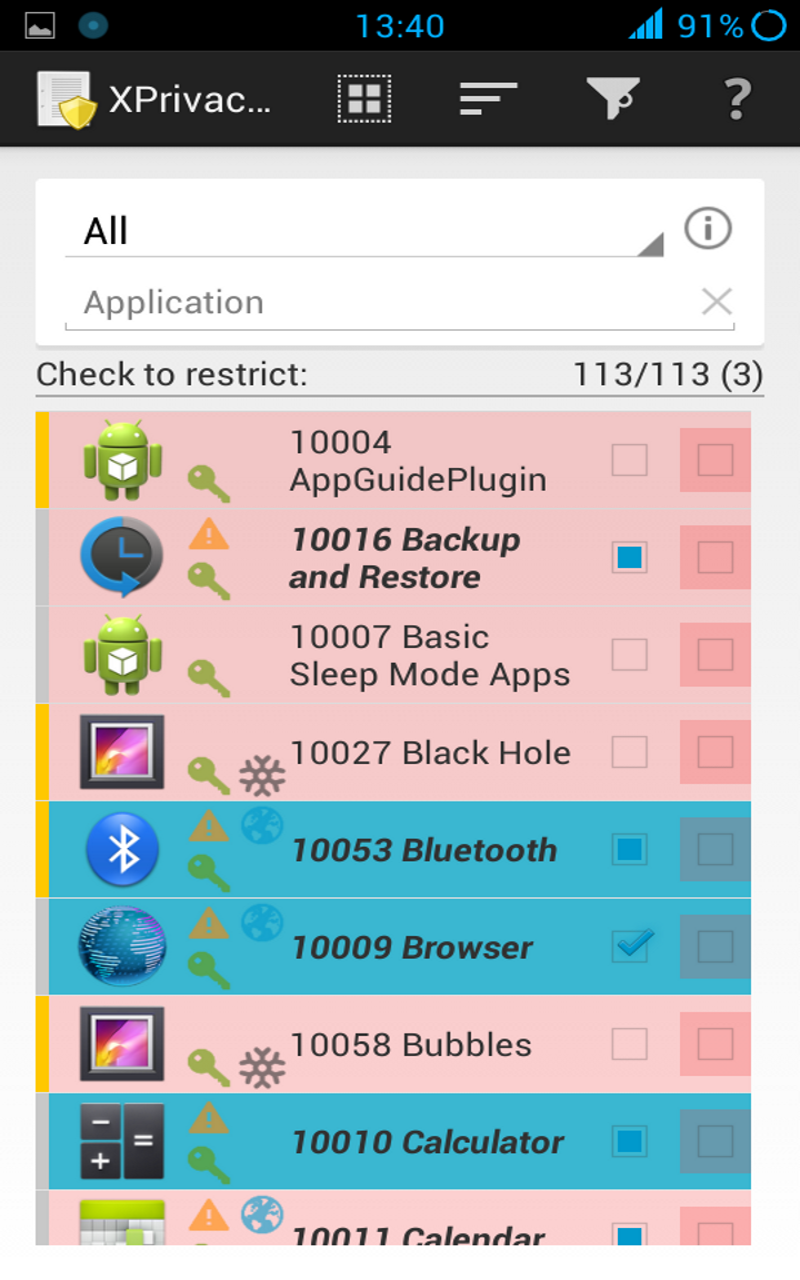
By default, all new put in applications can havent any access to any information class in any respect, to forestall a replacement application from leaky sensitive information right when installation. Shortly when putting in a replacement application, XPrivacy can raise that information classes you would like the new application to own access to. XPrivacy comes with AN application browser, that permits you to quickly alter or disable applications access to a selected information class (i.e. to look at and management all access to the camera, for example). its additionally attainable to edit all information classes for one application.
To help you determine potential information leaks, XPrivacy can monitor tries created by all applications to access sensitive information. XPrivacy can show a yellow triangle icon as before long as information of a knowledge class has been used. XPrivacy also will show if AN application has net access, indicating that the applying poses a risk of sharing the info it obtains with AN external server. this can be simply a tenet, since AN application may access the net through different applications too. If AN application has requested humanoid permissions to access information in a very information class, this can be displayed with a inexperienced tick icon, however this can solely be shown once watching a personal application, since checking permissions for all applications is sort of slow.
XPrivacy is made victimization the Xposed framework. XPrivacy faucets into variety of selected functions of humanoid through the Xposed framework. looking on the perform, XPrivacy not absolutely skips execution of the initial perform (for example once AN application tries to line a proximity alert) or alters the results of the initial perform (for example to come back empty calendar data).
XPrivacy has been tested with CyanogenMod ten and ten.1 (Android four.1 and 4.2), and can possibly work with any humanoid version four.1 or 4.2 variant, as well as stock ROMs. Root access is required to put in the Xposed framework. owing to a bug within the Xposed framework, XPrivacy presently wants a set Xposed binary, that is provided as transfer for each humanoid version four.1 and 4.2.
Version 1.10.25 BETA Display third state for classes not totally restricted (issue) Automatically open and scroll to class in application read Updated Chinese translations
Direct Download http://hugefiles.net/lh980953b1bm Mirror http://www.tusfiles.net/9ukio6arho63
While HTC might not exactly be in the best place financially at the moment, it seems that they are still thinking about their Android customers and have announced that select HTC Android devices will be eligible for free 25GB-50GB Google Drive storage for the next two years, after which these users will have to pay to continue the subscription or be unable to add new files.
For starters owners of the HTC One Max can look forward to 50GB of Google Drive storage, while select HTC Android smartphones from 2013 will be eligible for 25GB storage once HTC Sense 5+ becomes available, although it should be noted that the HTC One Developer Edition will be excluded from this promotion due to its unlocked bootloader (although we’re not sure why this should matter). In any case for those wondering if your HTC device is eligible for the free storage, all you’d have to do is launch the preloaded Google Drive app on your HTC device. You should see a “Redeem” button and if you do, you have to press it and follow the on-screen instructions to redeem your free storage.
This offer will be valid until January the 1st 2016, so don’t worry HTC users as you will have plenty of time to redeem it. The 2-year period will begin the moment you redeem the offer, so if you were to redeem it on the 1st of January 2016, it will be valid until 2018, and etc. More information on this offer can be found at Google’s website.